The capture tool built for an AI world.
Screenshots, screen recordings, voice notes, and meeting recordings that save straight to your Google Drive or S3, with diarized transcripts and calendar context, shareable with teammates, readable by AI agents.
Built for people tired of paying rent on their own files.
The desktop app needs an Apple Silicon Mac or Windows. Intel Macs are not supported, but the browser app works everywhere.
Already have an account? Sign in →
Three things other capture tools won’t do.

Your files stay yours.
Screen recordings, voice notes, and meeting recordings save directly to your Google Drive or S3 bucket. Klipr’s servers never store the file. Cancel us tomorrow and every recording stays where it already lives, playable in any video player, in standard formats.
You own the file. Klipr owns the link.

No expiring links on you.
Loom and CleanShot hook you with a free tier, then a cap, then your old links hit paywalls your coworkers can’t cross. Klipr links don’t expire while you’re a customer, don’t gate viewers behind a signup, and don’t watermark the video.
No view limits. No login walls.
Built for an AI-native world.
Other capture tools bolted “AI” on top. Klipr is an MCP server. Drop a klip link into Claude Code, Cursor, or ChatGPT and the agent reads the diarized transcript, keyframes, attendees, and origin URL as native context. Plus semantic search across your whole library: find what anyone said in any klip or meeting, ever.
Klips agents can act on.
Three steps. About thirty seconds.
Connect your storage.
Sign in with Google Drive (personal) or paste S3 credentials (teams). One time, two minutes. Klipr writes to a folder you choose.
Record anything.
Hit the menu bar icon. Capture a screen, a window, your voice, or a whole meeting. Klipr can spot a calendar event you’re in and tag the recording with the title, attendees, and agenda. Stop when you’re done. There’s no upload step.
Share the tracked link.
Klipr copies a link to your clipboard. Paste it anywhere. Recipients see the recording, a speaker-by-speaker transcript, and can leave comments pinned to timestamps.
How the data flows.
Capture sources on the left, your own storage in the middle, and every place a klip travels (humans, AI agents, and your existing tools) on the right.
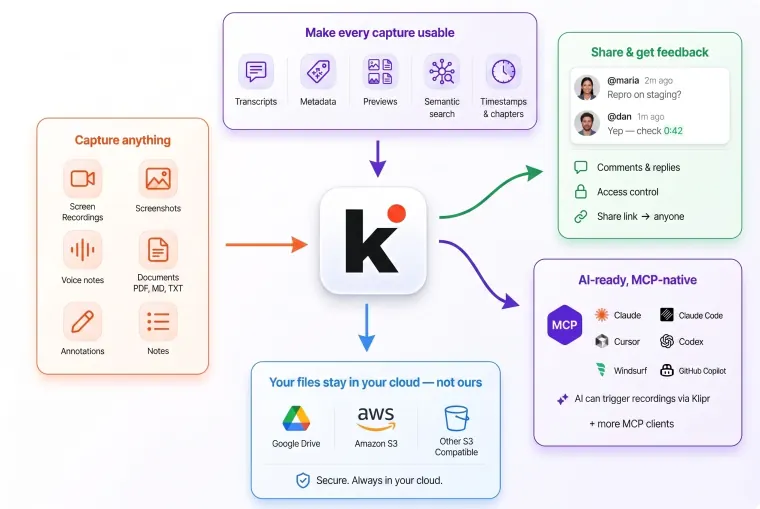
Built for the work that happens after you capture.
Most capture tools stop at the file. Klipr treats every recording as a small workflow: shareable, trackable, discussable, and answered.
Bug reports your engineers can actually act on.
Record the bug, the console, and your narration in one link. Comments thread on the timestamp where it broke.
Design feedback without a Zoom call.
Stakeholders leave voice and text notes pinned to the frame they’re reacting to. No more “on slide 4ish?”
Async client walkthroughs.
Send a recorded walkthrough instead of scheduling a call. Clients reply on the page itself, not in email.
Support tickets with proof.
Customers record the issue. You see exactly what they saw, with the URL and console captured automatically.
Meeting recordings, without a SaaS bot.
Record your Meet, Zoom, Teams, or Webex call with one hotkey. No third-party note-taker joins the call. The recording, diarized transcript, and calendar context (title, attendees, agenda) attach automatically. Video lands in your Drive; AI agents read it through MCP.
Pick where your files live.
Files save to your own Google Drive or your S3 bucket. Capture as much as your storage holds.
- Your Google Drive or your S3 bucket
- Recordings, screenshots, voice notes, meetings
- Diarized transcripts + comments
- Calendar-aware meeting capture
- Tracked share links
- Mac and Windows apps
Air-gapped or single-tenant deployments on your own infrastructure.
- On-prem, your VPC, or BYOK
- AWS, GCP, or Azure
- Custom data residency
- Single-tenant deployment
- Dedicated support
Teams plan coming soon: shared workspaces, admin controls, SSO. Join the waitlist →
Compare plans
| Compare | Personal | Teams soon | Enterprise |
|---|---|---|---|
| File location | S3 and Google Drive | Shared S3 and Shared Google Drive | Your VPC / on-prem |
| Shared workspace | No | Yes | Yes |
| SSO | No | Annual plan | Yes |
| Audit log | No | Yes | Yes + retention controls |
| Deployment | Cloud | Cloud | Air-gapped available |
Want early access?
Drop your email and we’ll reach out the moment it’s ready.
06 · For developers
Point an AI at anything on your screen.
Klipr is a Model Context Protocol server. Claude Code, Cursor, Cline, and any MCP-compatible agent can ask Klipr to record your screen, then read the transcript and frames back as context. Show the bug instead of describing it.
You record once.
Voice, screen, and annotations become a single URL the agent can read. Timestamps, keystrokes, and the page URL travel with it.
The agent fills in the intent.
For non-trivial walkthroughs, the agent transcribes your narration and aligns it to the keyframes. You stop before “go” so it can finish thinking.
Interpretation gets written back.
Every prompt the agent runs on the klip is stored on the page. Auditable, replayable, visible to every tool that opened it.
The misaligned toggle at 0:12 is in Toggle.tsx:34. Patching now.
start_recordingOpen the recorder pre-armed. The agent never captures without you clicking start. Privacy by design.get_klipMultimodal transcript: timestamps, keyframes, and narration anchored together.list_recent_klips“Open the one I made earlier today” works without copy-pasting URLs.search_klipsSearch across transcript, title, and description.await_recordingLong-poll for the klip the user just captured.record_interpretationWrite the agent’s prompt and answer back to the klip, auditable forever.Works with Claude Code, Cursor, Cline, claude.ai, ChatGPT, anything that speaks MCP.
Free for personal use.
Priced fairly for teams.
Personal capture is free: no credit card, no upload caps. AI is optional: bring your own OpenAI key with no Klipr markup, or use Klipr-managed AI with clear usage-based pricing after the included trial. Team and enterprise plans add shared workspaces, SSO, and private deployment. Files always live in your storage, so leaving Klipr means keeping every recording you’ve ever made.
Or get the desktop app for Apple Silicon Mac or Windows